
BOOKED WORK TO RUN?
KEEP THE NEXT STEPS TOGETHER.
Once the clean is booked, there is still a crew to assign and an invoice to send. Try that workflow in Cleanr for $59/month or $599/year. Check your customer-booking requirements before switching from Launch27.
Know which part of the work you’re buying for
Test Cleanr for recurring schedules, crew assignments, visit photos, and invoices. Cleanr does not include a customer self-booking form. If that is central to your business, keep it on the must-have list when comparing Launch27.
Reviewed by the Cleanr Editorial Team · Sources checked September 24, 2026 · Published by Cleanr, a product included below · How we compare software
KEEP THE CLEAN CONNECTED TO THE INVOICE.
Actual Cleanr web screens, captured September 11, 2026 with fictional demo records. Select an image to view it at full size.
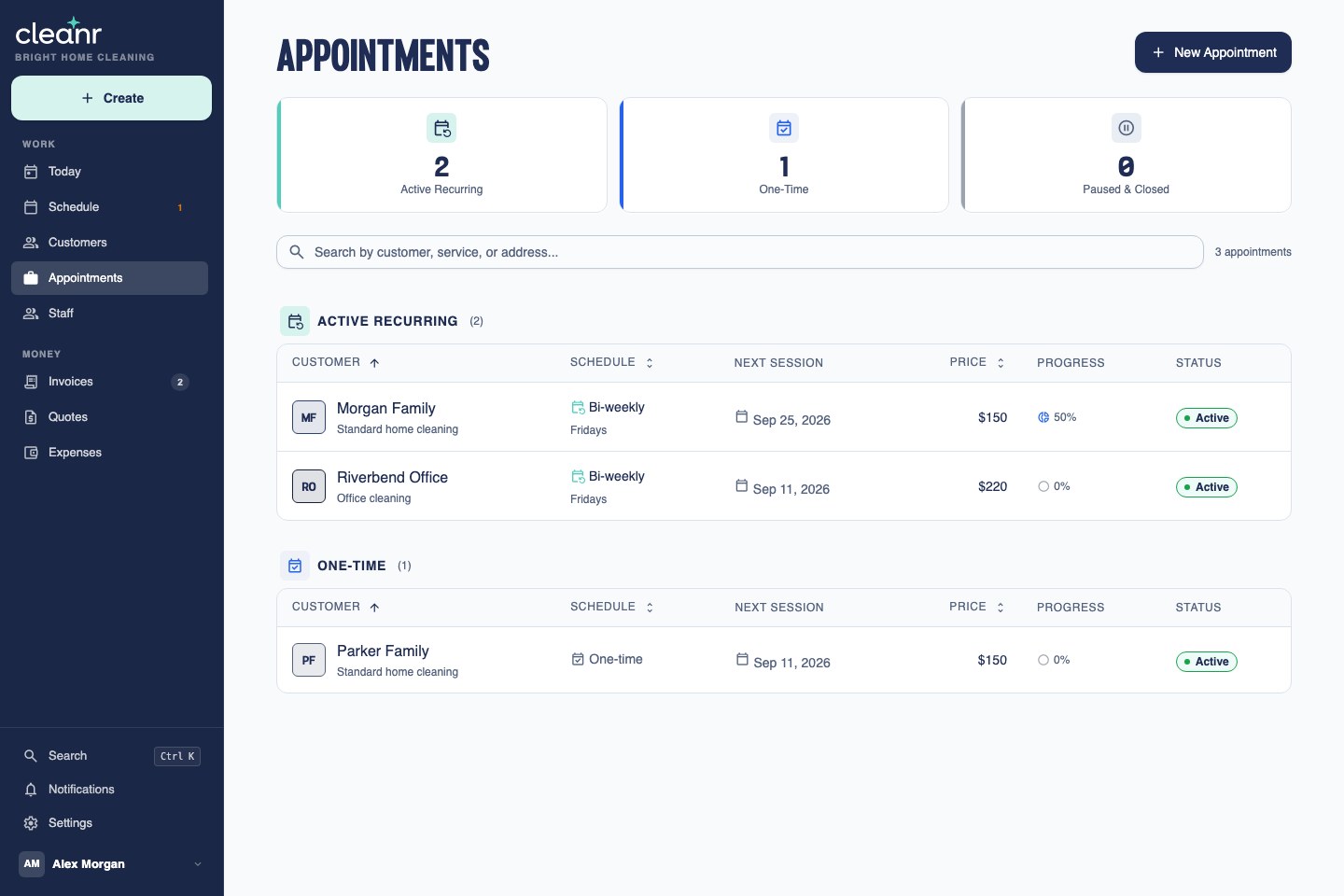
1. Review the recurring work
Keep the next visit and repeat frequency in view before planning the week. Start with the recurring scheduling workflow.
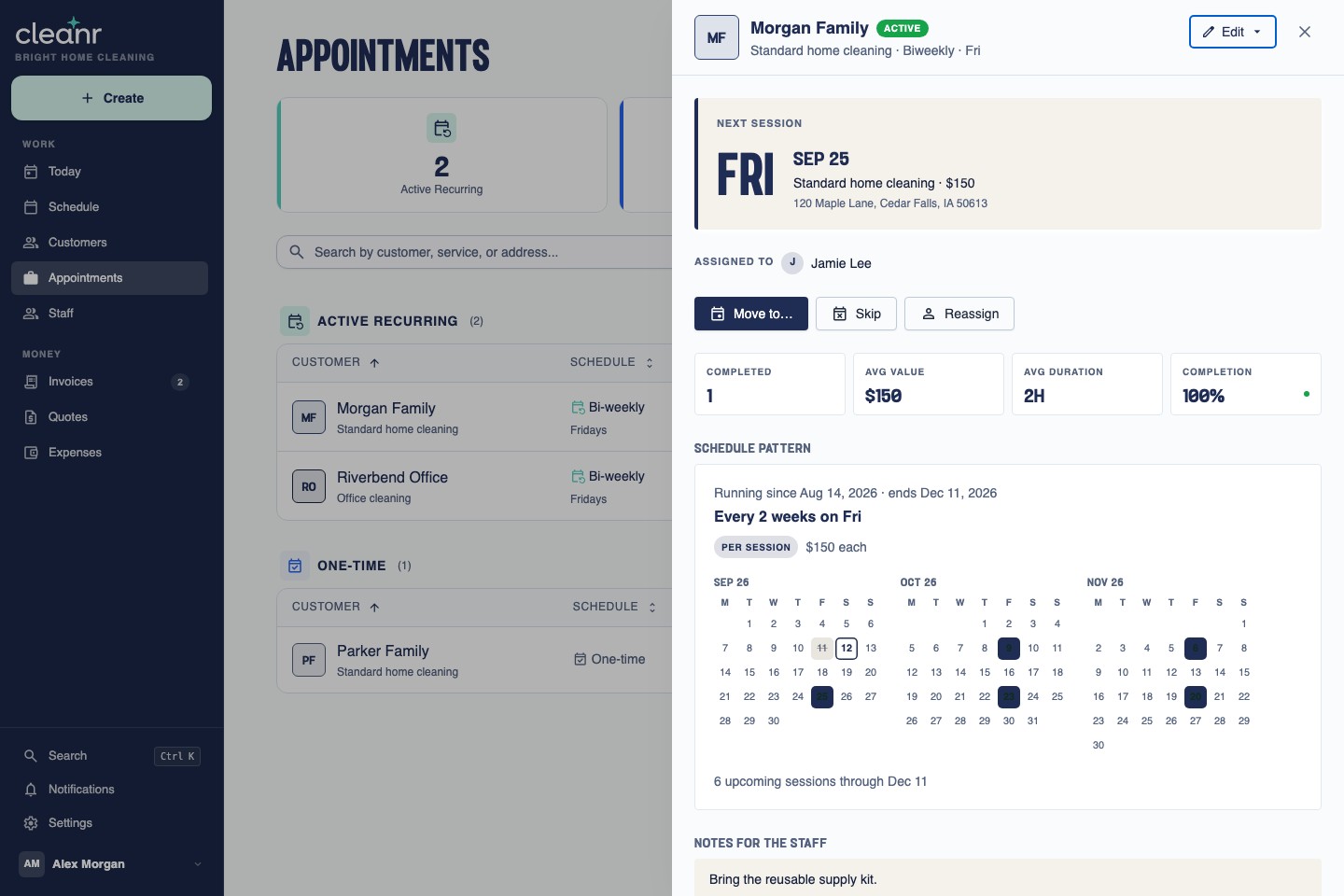
2. Check the next visit’s assignment
Open an appointment to review its assigned cleaner, future visits, and staff notes. See the staff assignment and time-tracking features.
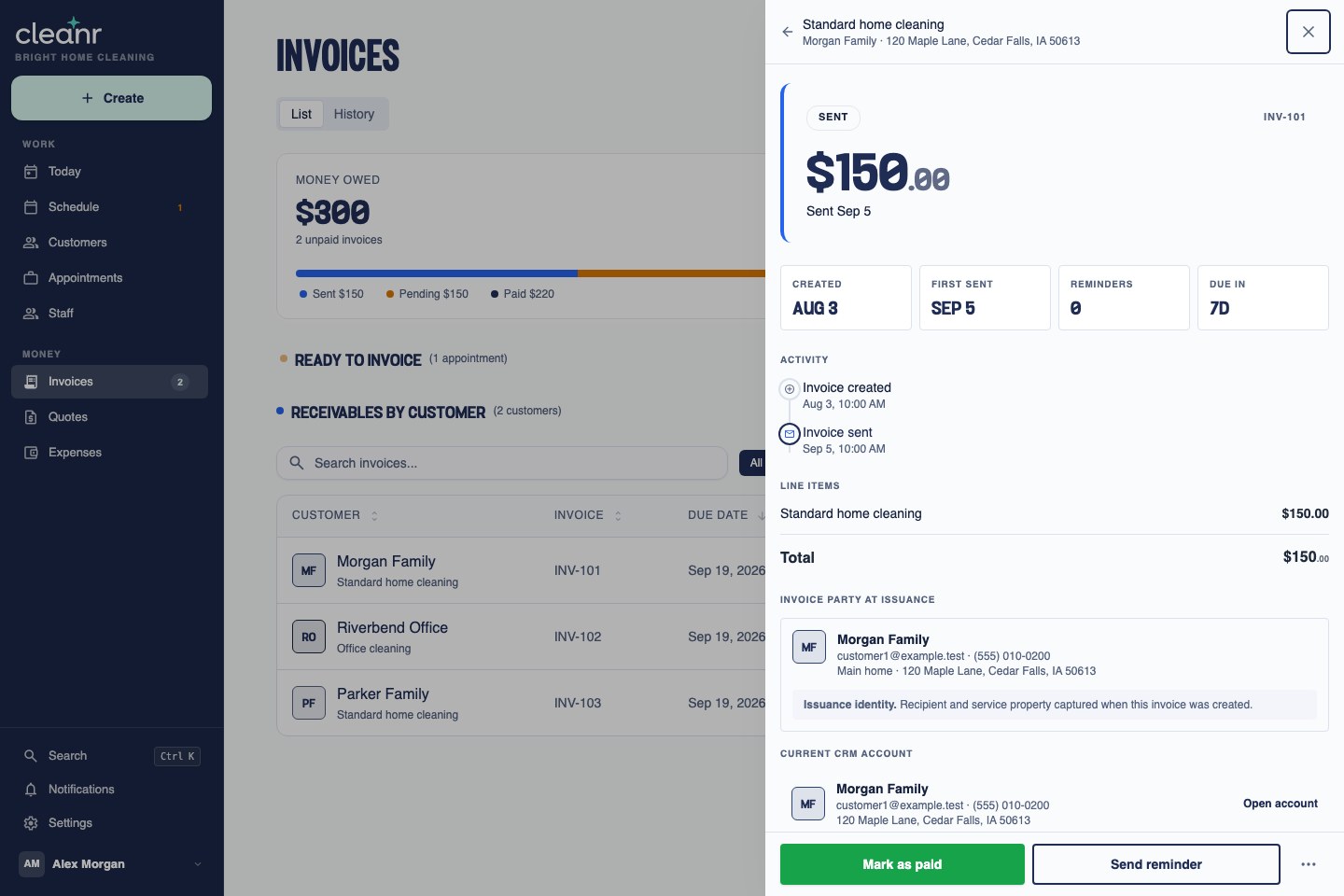
3. Review the invoice and its status
Check the customer, line item, total, and invoice activity in one place. Explore Cleanr invoicing and payments.
COMPARE PLANS USING THE DATED SOURCES BELOW.
| Product / plan | Monthly price | 12 monthly bills | Annual subscription |
|---|---|---|---|
| Launch27 Base | $75 | $900 | $765 |
| Launch27 Pro | $150 | $1,800 | $1,530 |
| Launch27 Plus | $299 | $3,588 | $3,049.80 |
| Cleanr Pro | $59 | $708 | $599 |
Launch27 includes unlimited users and bookings. Its annual prices reflect the advertised 15% discount. Cleanr costs $166 less than Base on annual billing ($765 − $599), or $192 less across 12 monthly bills ($900 − $708). The products are not feature-identical. Messaging, processing, tax, and any migration or overlap costs are excluded. Sources: Launch27 pricing matrix and Cleanr pricing.
WHICH FEATURES DOES YOUR BUSINESS DEPEND ON?
| Need | Published tier | What to test |
|---|---|---|
| Basic online booking | Base | Branded form, service price, available time, and confirmation. |
| Custom form design and integrations | Pro | Your branding and the exact Calendar, QuickBooks, Zapier, or Twilio connection. |
| Cleaner apps, photos, automated charging | Plus | Crew check-in, photo capture, payment authorization, and failed-payment handling. |
| Location-specific pricing and availability | Plus | Different service areas and the staff or time slots each one exposes. |
Base’s mobile-friendly interface is distinct from the app access listed under Plus. Use the vendor’s full plan matrix to verify dependencies beyond the selected capabilities shown here.
Test the actual booking journey
Launch27’s product overview describes live availability and pricing by bedrooms, hours, area, or custom rules. Submit a representative booking on a phone. Check repeat frequency, extras, discounts, location eligibility, and the confirmation a customer receives.
Test the work after booking
In Cleanr, build the recurring schedule, assign a cleaner and record time, then document the job and prepare the invoice. Verify the home instructions and customer record remain attached to the work.
CHOOSE THE FIT BEFORE PLANNING THE MOVE.
Choose Cleanr when…
An owner or small office plans recurring work directly and wants a predictable subscription for scheduling, customer records, staff assignments, time, photos, quotes, and invoices. It is $599/year or $59/month, with the same feature set and a 14-day trial. Online payments require connecting Cleanr Pay through Stripe; processing fees apply.
Keep Launch27 when…
Your current booking flow turns website visits into confirmed work with little office intervention. Identify the forms, rules, integrations, and payment steps responsible. Do not replace a working revenue path until the alternative handles the same test cases.
Ask about any essential integration
Write down what must sync, in which direction, and how an error is handled. A logo on a features page does not tell you whether the integration covers your workflow. Ask for a demonstration using a representative customer and invoice.
Include the cost of the change
Budget the time to rebuild forms, retrain staff, reconcile open invoices, and run two subscriptions briefly. Subscription savings alone do not establish that switching will save money in the first month.
MAKE A SMALL PILOT YOUR FIRST STEP.
- Save the existing rules: record service pricing, extras, discounts, recurring frequencies, availability, and location-specific exceptions.
- Confirm export and import scope: preserve available customer and booking records. Cleanr’s documented importer covers Jobber customer CSVs; confirm another format before planning a bulk transfer.
- Pilot five customers: recreate future visits, verify access notes and staff, and reconcile each invoice total.
- Choose a cutover time: coordinate the website form, customer notifications, reminders, and invoice ownership so two systems do not book or bill the same work.
- Rehearse before cancelling: complete a mobile booking test, a cleaner handoff, and an invoice preview. Preserve historical records and use supported payment-provider processes for any payment setup changes.
Start the Cleanr pilot with the first appointment guide. Keep the old booking route available until the replacement has passed your checks.
Cleanr’s field workflow currently uses its iPhone app. If your crew uses Android, confirm that requirement before switching. See the scheduling features and limitations.
How we checked this comparison
Public documentation and calculator checks, reviewed September 24, 2026.
Cleanr publishes this comparison and sells one of the products discussed. We used the sources below; we did not run a hands-on trial of the competitor apps. Worked examples are our calculations, not customer results.
Launch27 pricing and tier matrix; Launch27 booking workflow overview; Cleanr pricing; Cleanr import scope.
The Cleanr images are existing September 11, 2026 captures of actual interfaces using fictional demo records. They illustrate the owner’s web workflow; they do not show live customer activity or a competitor trial.
Questions before you choose
What does Launch27 cost on annual billing?
The published annual subscriptions are $765 for Base, $1,530 for Pro, and $3,049.80 for Plus. These are different from paying each monthly price twelve times. Verify current terms and additional costs before buying.
Which Launch27 plan includes cleaner mobile apps?
Its pricing matrix lists mobile app access for cleaners and office staff under Plus. Base lists a mobile-friendly interface. A responsive website and a dedicated app are different requirements, so test the experience your team needs.
Does Cleanr replace every Launch27 booking feature?
Do not assume feature parity. If your revenue depends on a particular embedded form, pricing rule, location control, integration, or automated charge, make that a required pilot test. Choose Cleanr for the workflows you have actually verified.
Can I switch from Launch27 during Cleanr’s trial?
Use the 14-day trial for a small pilot before a full cutover. Confirm export and import scope, recreate representative recurring work, reconcile invoices, and decide when booking forms and reminders change. Preserve the old records before cancelling.
TEST THE WORK YOU ALREADY HAVE BOOKED.
Set up a few customers, repeat visits, and a crew assignment. Review the invoice flow during your 14 free days. No credit card required.
14-day trial. No credit card required. Add a payment method to continue after your trial. Without one, your trial ends with no charge.