
MAKE THE WORK CLEAR.
MAKE YES EASIER.
Give the customer one quote with the work, price, and terms laid out. Send a secure link for their response. When they accept, turn the agreed work into an appointment when your schedule is ready.
$599/year or $59/month · Web dashboard + iPhone app · Cancel anytime
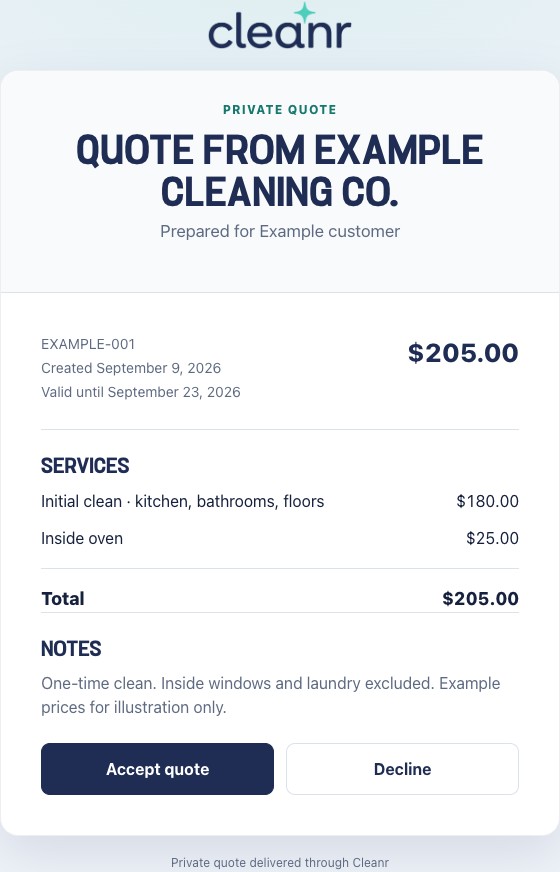
The actual customer quote screen, shown with a fictional business and customer. The $180 clean and $25 oven add-on are illustrative prices, not market rates.
ANSWER THE QUESTIONS THAT HOLD UP APPROVAL.
What will you clean? What will it cost? How long is the offer valid? Put those details on the quote so the customer can review and respond from one link.
Spell out the extras
List the base clean and extras separately. Explain what’s included and excluded so the customer knows what the total buys.
Know whether they replied
See whether a quote is pending, sent, accepted, declined, or expired. Resend the link when a customer needs another copy.
Keep approval connected to the work
Check the timing and crew before you convert an accepted quote. Customer approval does not dispatch a cleaner by itself.
QUOTE IT. GET THE REPLY. PLAN THE CLEAN.
Use one process for a first clean, an extra service, or proposed repeat visits.
1
Build the cleaning quote
Open Quotes and choose New Quote. Select the customer, add services or custom items and prices, and describe the proposed work in the notes. For recurring items, review the frequency and the exact recurring terms before sending.
2
Send it for customer approval
Review the details, then save and send the secure customer link. Check the quote status for the response. Email delivery requires valid customer and business email details.
3
Turn accepted work into an appointment
Choose the appointment details and review assignment and capacity. For recurring work, confirm the accepted timing and billing terms. Finish conversion when the schedule is ready; accepting a quote does not automatically dispatch your crew.
A STRONG OFFER STARTS WITH CLEAR SCOPE.
Show the customer what they get for the price. Cleanr keeps the quote organized; you choose the work and the rate.
Make the included work easy to see
- Name the service and the rooms or areas it covers.
- Separate extras such as an oven clean from the base service.
- State exclusions and conditions in the notes.
- Check whether the offer is one-time or recurring.
Check what the job costs you
Allow for labor, supplies, travel, overhead, and the margin your business needs. Adjust for the condition of the home and the agreed service, then make the offer clear to the customer.
How to price house-cleaning jobs Check a job’s estimated profit
NEED A DOCUMENT OR A CONNECTED PROCESS?
Start with a free estimate template
If you need a reusable document, use the cleaning estimate template to organize the scope, items, and proposed total. You handle sending it, recording the reply, and moving the approved work to your calendar.
Use Cleanr to keep the process connected
When you need quote status, secure customer approval, customer history, and appointment conversion together, use Cleanr. The work continues into scheduling and, separately, invoicing and payments.
START WITH THE NEXT QUOTE YOU NEED TO SEND.
Try the owner workflow on the web or iPhone. Build a quote for a real cleaning job and review the page your customer will receive.
You control scope and pricing
This is a quote and approval workflow. Cleanr does not determine a profitable cleaning rate for you. Start with your own costs and service assumptions, and verify the result before you send it.
Approval and dispatch are separate decisions
On iPhone, recording verbal approval with Mark Accepted is not a digital signature. Recurring conversion also requires complete timing, capacity, and billing terms. Review the quote guide and test your arrangement in the trial.
What to know before you send a quote
Does Cleanr call estimates quotes?
Yes. In Cleanr, open Quotes to propose work and pricing for customer approval. This page uses cleaning estimating software to describe that workflow. An invoice is separate: it asks the customer to pay for the work.
Can a customer accept a cleaning quote online?
Yes. The customer can review and accept or decline through the secure link. On iPhone, you can also record approval received elsewhere using Mark Accepted, but that records your confirmation of the customer’s approval; it is not a digital signature.
Can accepted quotes become recurring appointments?
Yes. Cleanr supports one-time and recurring work. For recurring work, confirm the exact timing, capacity, and billing terms, then review assignment and capacity before conversion. Acceptance alone does not dispatch a cleaner.
Does Cleanr choose the right price for a cleaning job?
You choose the scope and price. Cleanr organizes the quote and approval workflow. Estimate the labor, supplies, travel, overhead, and margin for your own business before you send the offer.
MAKE YOUR NEXT QUOTE THE TEST.
Set the scope and price. Preview the customer page. Follow approved work into the schedule. Try the full process for 14 days with no credit card required.
14-day trial. No credit card required. Add a payment method to continue after your trial. Without one, your trial ends with no charge.